Custom Hardware

🔀 MidiXLate Router

Highly configurable MIDI hardware router for complex studio and live-performance networks.

True MIDI routing, not just a hub

Unlike a MIDI hub that broadcasts everything to everyone, MidiXLate inspects every MIDI data packet and routes it exactly where it needs to go. Define routing, filtering, translation, and channel rules from your PC, then download them to the router. A blazingly fast 84 MHz ARM Cortex-M3 CPU processes each MIDI message in microseconds — far below any perceptible latency.

  • Custom built hardware router with 7 MIDI In × 7 MIDI Out ports (6 DIN + 1 USB-C)
  • Runs standalone — the configuration is stored on a microSD card, no PC needed once downloaded
  • Free Windows PC configuration app with visual rule builder — save, open and download configurations, start from a sample, copy / paste / drag-and-drop rule lines, bulk copy / move / delete
  • Intuitive port routing as simple as a click of the mouse
  • Name every device — port names and abbreviations appear in the app and on the router
  • Filter MIDI by input & output port: notes, program change, control change, pitch bend, aftertouch, SysEx, and clock / transport (start, stop, MTC, song position)
  • Translate MIDI commands from one format to another (note, control change, program change in any combination)
  • Block, Step and Bank Change rules — block specific messages, step a value up or down (foot-pedal volume), or turn one program change into a full bank select. Up to 128 rule lines; several rules can act on one message
  • Channel locking — force any input-to-output path to a chosen MIDI channel
  • Large SysEx dumps pass through at full MIDI speed, over DIN and USB
  • Robust MIDI stream handling — running status, and clock bytes arriving in the middle of other messages
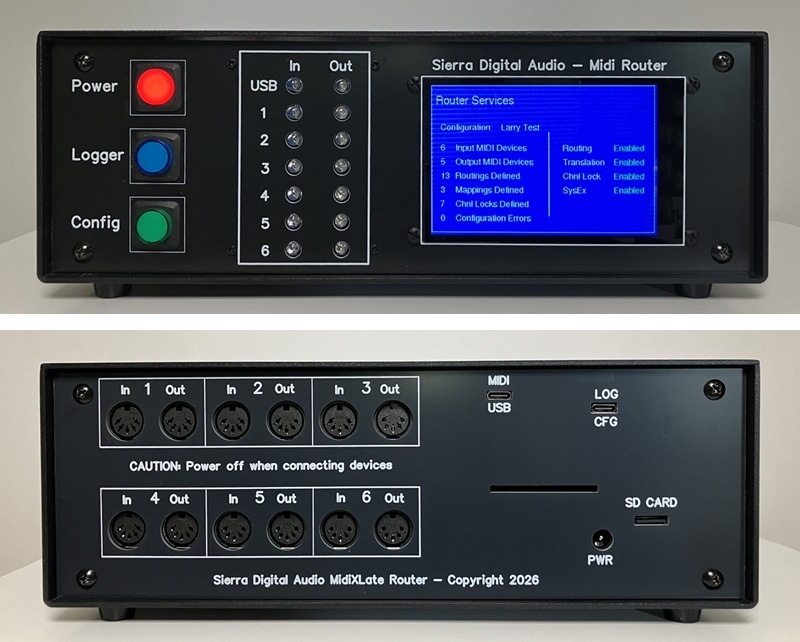
  • Color front-panel display: configuration, device names, routing, filters and channel locks, plus a live MIDI monitor
  • Per-port activity LEDs, and detailed logging to a PC terminal over USB-C
  • USB-C MIDI port appears to your computer as a standard class-compliant USB MIDI device
  • Extremely fast Atmel SAM3X8E ARM Cortex-M3, 84 MHz processor
  • Test drive by renting before purchase — rent applied to purchase
MidiXLate Router — Front & Rear View
MidiXLate hardware MIDI router front and rear panel showing 6 MIDI DIN input and output ports plus USB click to enlarge
MidiXLate Connection Example
PC MIDI USB-C Port 1 Keyboard MIDI Out Drum Machine MIDI Out Sequencer MIDI Out Pedalboard MIDI Out MidiXLate ARM Cortex-M3 · 84 MHz 7×7 ports · Route · Filter · Translate Integra-7 synth Yamaha MU 15 Tone Generator Reaper DAW record / playback Fractal Axe guitar effects PC Config App Config via USB-C Port 2 Blue = MIDI In · Orange = MIDI Out · Routes only to intended destinations
Screenshots (click any image to view full size)
PC configuration app
Router TFT display

Pricing & Specifications

Hand-built to order in Truckee, CA. Limited availability — contact us to discuss your requirements.

Purchase price
$850
Hand-built in Truckee, CA · includes email support
Rent before you buy: $150/month (customer pays shipping both ways). Rental cost applies toward purchase price.
Inquire about your custom built router
Specifications
ProcessorAtmel SAM3X8E ARM Cortex-M3
Clock speed84 MHz (1000+ MIDI cmds / sec)
MIDI ports6 MIDI DIN in/out, 1 USB-C in/out (7 × 7 routing)
Latency<1 ms (microsecond processing)
Configurationvia USB-C Port 2 from PC app
Loggingvia USB-C Port 2 to PC TTY
FilteringNote / CC / PC / pitch bend / aftertouch / SysEx / clock-transport, per input and output port
TranslationNote, CC and PC in any combination; Block, Step, Bank Change; up to 128 rule lines
Channel lockForce any input-to-output path to a chosen channel
SysExFull MIDI speed, DIN and USB
DisplayColor front-panel display with live MIDI monitor
StorageConfiguration on microSD, runs standalone
AvailabilityLimited — custom builds

Photos & Configuration Screens

Click any image to view full size.

Router hardware photos and PC configuration app screens

Frequently Asked Questions

Everything you need to know about MidiXLate and MIDI routing.

What is a MIDI router?
A MIDI router is a hardware device that directs MIDI data from one or more input devices to one or more output devices. Unlike a simple MIDI thru box or hub that sends all data everywhere, a true MIDI router like MidiXLate inspects each MIDI packet and routes it only to the intended destination — giving you precise control over which devices receive which MIDI messages.
How is MidiXLate different from a MIDI hub or thru box?
A MIDI hub or thru box simply duplicates all incoming MIDI data and sends it to every connected device. MidiXLate is a true router — it inspects every MIDI packet and routes it exactly where you define, with filtering, translation, and channel locking. You control which input ports send to which output ports, and which types of MIDI messages are allowed through.
Can MidiXLate filter specific MIDI messages?
Yes. MidiXLate filters by MIDI message type — Note, Program Change, Control Change, Pitch Bend, Aftertouch, SysEx, and clock / transport (start, stop, continue, MTC, song position) — separately for every input and every output port. For example, you can allow notes to pass from a keyboard to a synth while blocking program change messages, limit a pedal board to only sending CC messages to specific devices, or keep MIDI clock away from a device that does not need it.
What can the translation rules do?
Each rule line watches for a specific incoming message — by input port, message type, channel and value — and acts on it. A rule can translate it into a different message (note, control change or program change, in any combination), block it from reaching a port, step a value up or down each time it arrives (for example foot-pedal volume up and down), or turn a single program change into a full bank select. Up to 128 rule lines are supported and several rules can act on the same incoming message. Channel locking can also force any input-to-output path onto a chosen MIDI channel.
Can MidiXLate pass large SysEx dumps?
Yes. SysEx is passed at full MIDI speed, in both directions between the DIN ports and USB, so patch and bank dumps from synths and effects units go through without being throttled. SysEx is routed and filtered per port like any other command. MIDI clock and other real-time messages are handled correctly even when they arrive in the middle of another message or a SysEx, and running status is supported.
Does MidiXLate have a display?
Yes. A color display on the front panel shows the loaded configuration name and rule counts, the device names, the routing matrix, the port filters and the channel locks, which you step through with the Config button. With the Logger button engaged it also shows a live monitor of the MIDI received and sent. Every port has its own activity LED, and detailed logging can also be sent to a PC terminal over USB-C.
How do I configure MidiXLate?
MidiXLate includes a free Windows PC configuration app. Connect via USB-C Port 2 and use the visual rule builder to define your routing, filtering, translation, and channel locking rules. Once configured, download the rules to the router — it then operates standalone without a PC connection.
Can I try MidiXLate before buying?
Yes. Sierra Digital Audio offers a rental program at $150/month (customer pays shipping both ways). The full rental cost applies toward the $850 purchase price if you decide to buy.
What is the latency of MidiXLate?
MidiXLate uses an 84 MHz ARM Cortex-M3 processor that handles each MIDI message in microseconds, resulting in less than 1ms of latency — far below any perceptible threshold for live performance.
Does MidiXLate work with all MIDI devices?
Yes. MidiXLate uses standard 5-pin DIN MIDI connections and is compatible with any device that sends or receives standard MIDI. It also has a USB-C port for connection to a PC running the configuration app or for use as a USB MIDI interface.
Is this a limited product?
Yes — each MidiXLate router is hand-built to order by Larry Scott at Sierra Digital Audio in Truckee, CA. Availability is limited. Contact us to discuss your requirements and lead time.

Interested in MidiXLate?

Contact us to discuss your studio setup, ask about availability, or arrange a rental trial.

✉ Email Us 📞 925-765-2883

📍 Sierra Digital Audio · Truckee, CA 96161

Free Windows software to complement your MIDI hardware setup.