🎸 AxeFXIIControl

A free Windows MIDI control and setlist app for the Fractal Audio Axe-Fx II, XL and XL+ (also written Axe FX 2 or AxeFX II) — built for playing live.

Free Software

Your Axe-Fx II, your stage, your control!

AxeFXIIControl brings your Fractal Audio Axe-Fx II, XL or XL+ onto your computer screen, so the features buried behind front-panel buttons and menu pages are a click away. It is built for two kinds of players: the home-studio guitarist who wants to find a preset, switch scenes or bypass a block without hunting through pages, and the stage performer who needs setlists, a big Stage Monitor and foot-pedal control they can rely on in the middle of a song. It adds what the Axe-Fx II never had (setlists with songs and sections, instant preset search and a scene matrix) and lists every front-panel function, numbered and searchable, with step-by-step button instructions and, wherever MIDI allows, a control that does it for you.

Complements Axe-Edit, never replaces it. AxeFXIIControl works alongside Fractal Audio's Axe-Edit; it is not a replacement. Keep using Axe-Edit to build and fine-tune your tones, and use AxeFXIIControl to find, organize and play them. One click hands the Axe-Fx II over to Axe-Edit, and AxeFXIIControl reconnects when Axe-Edit closes.

  • Live control — preset list by number and name, ▲ / ▼ next and previous, 8 scene buttons, every block's engage / bypass and X / Y, tap and set tempo, tuner readout and looper
  • Two-way sync — follows changes made on the Axe-Fx II front panel; connects automatically and keeps trying for 5 minutes if the unit is switched on later
  • Presets — a local list of all 768 presets with names, amps, cabs, drives and blocks; instant search; ships with the XL / XL+ factory list; Resync All, Selected or Range
  • Setlists — songs with named sections (each a scene, and optionally its own preset), tempo and notes; drag presets in; print and export; full-screen Perform view
  • Stage Monitor — a big display for a second monitor or TV, readable from 10 feet: song, section, next, preset, stage banners (DROP D), tuner strip, setlist view and browse-then-Go
  • Foot Control — Behringer FCB1010, MFC-101 or any MIDI pedal; MIDI Learn with Bank + Program Change, latching / momentary switches, pedal calibration, long press and profiles
  • Scene Matrix — all 8 scenes of a preset against every block on one screen; click to change a block in a scene
  • Settings — 98 Axe-Fx II functions numbered by importance and searchable, each with front-panel button steps and, where possible, a MIDI control that does it for you
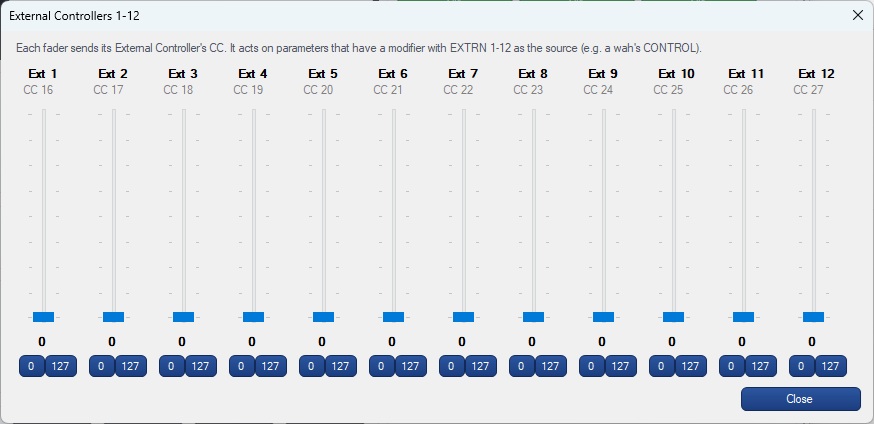
  • Controllers — External Controllers 1–12 as faders; CC Map with MIDI Learn-friendly defaults; Test MIDI finds the unit's MIDI channel
  • Axe-Edit hand-over — one button starts Axe-Edit and reconnects when it closes
  • Standalone — Axe-Fx II USB or any USB-MIDI / DIN-MIDI interface · 100% offline · no license key
Fractal Audio Axe-Fx II XL+ front panel
Live Control (click to view)
Presets, scenes, blocks, tempo, tuner and looper
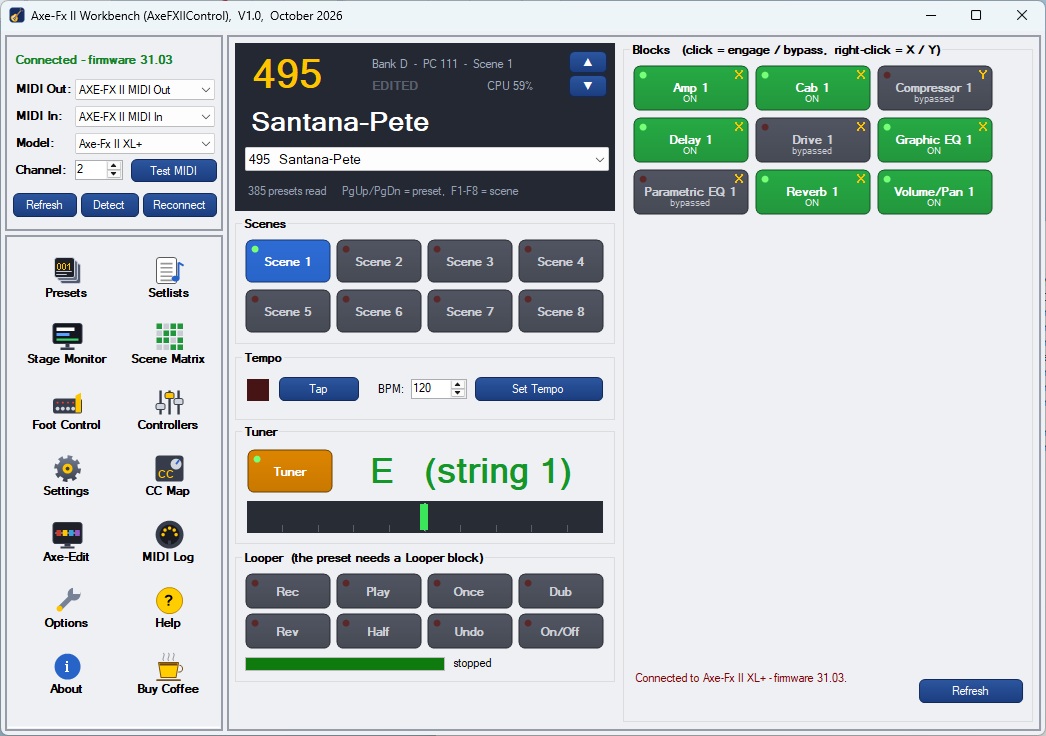
AxeFXIIControl main window — preset list, scenes, blocks, tempo, tuner and looper for the Axe-Fx II
Presets (click to view)
Every preset with amps, cab and drive; search and resync
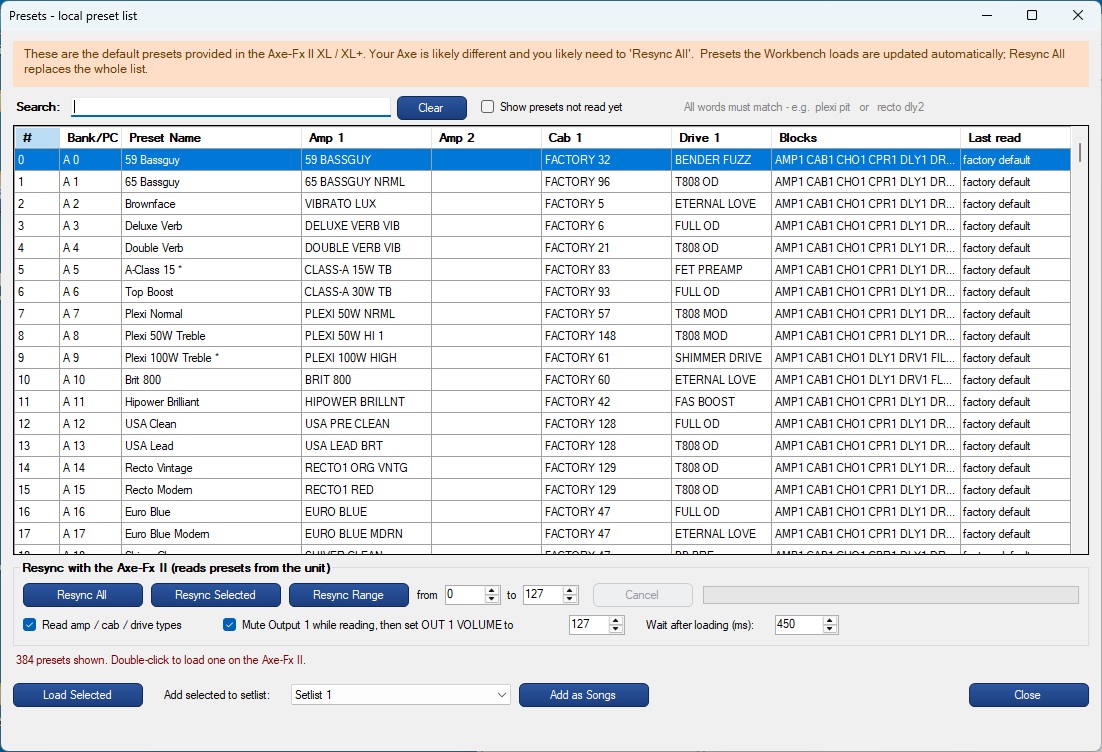
AxeFXIIControl Presets — local list of all presets with amps, cabs, drives and blocks, search and resync
Scene Matrix (click to view)
Every block across all 8 scenes, bypass and X / Y
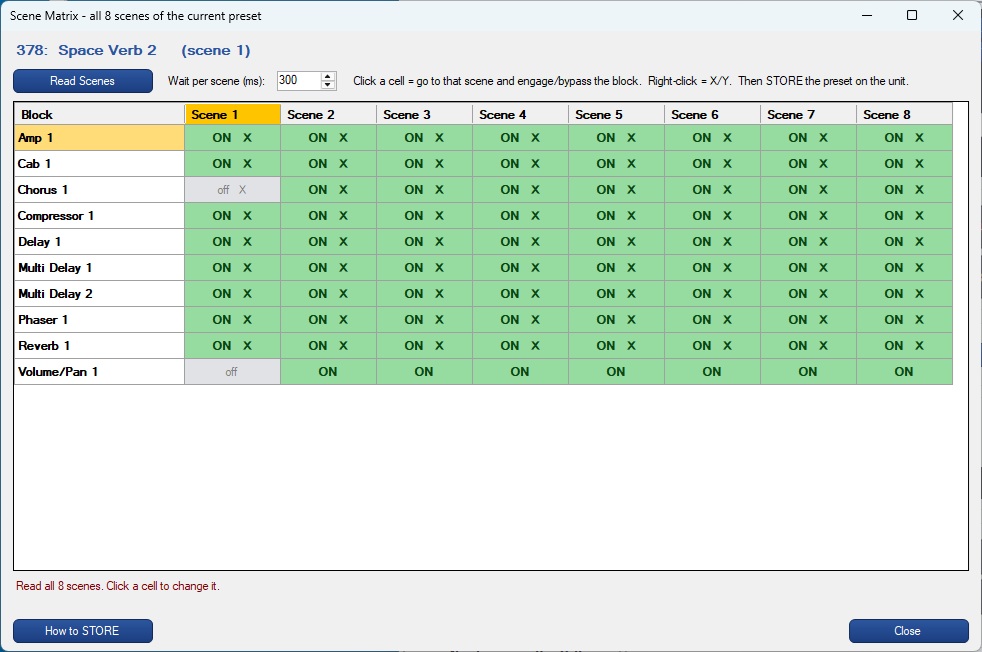
AxeFXIIControl Scene Matrix — every block against all 8 scenes, engaged / bypassed and X / Y
Setlists (click to view)
Setlists, songs and presets with drag and drop
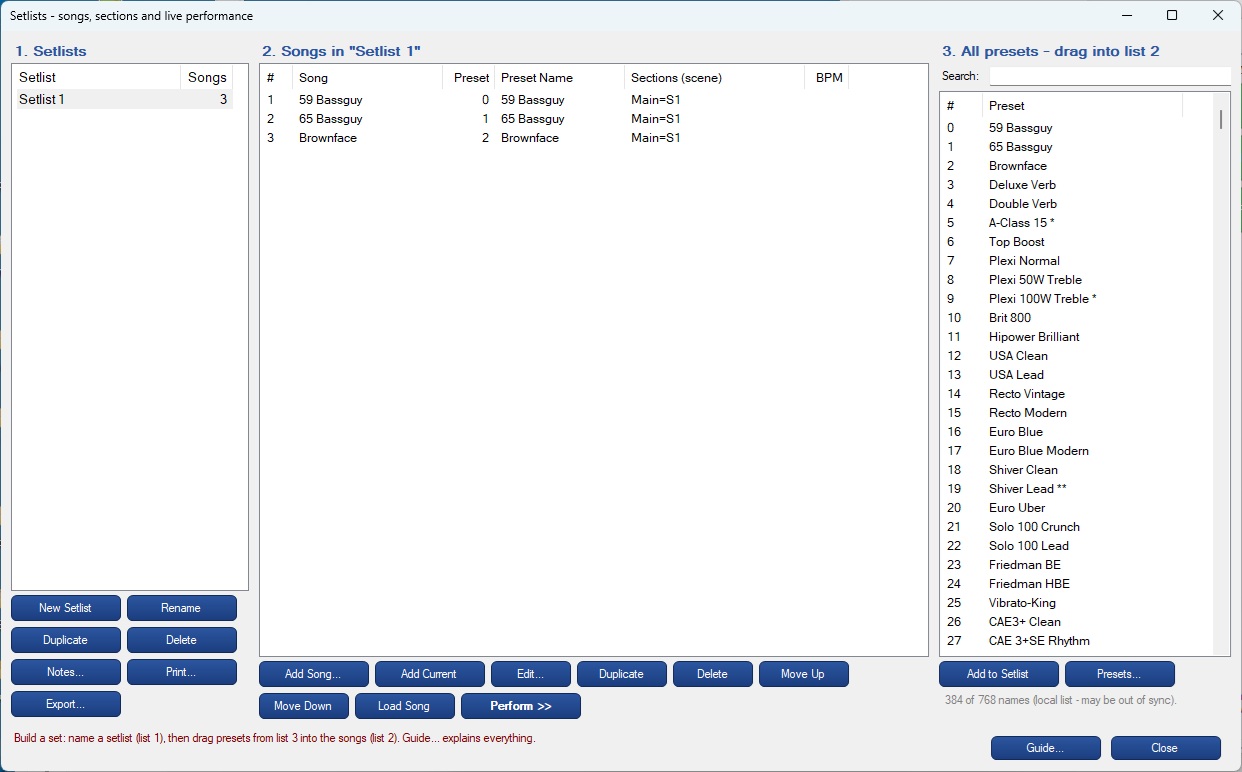
AxeFXIIControl Setlists — setlists, songs and all presets side by side with drag and drop
Stage Monitor Settings (click to view)
Screen, text size, theme, tuner and messages
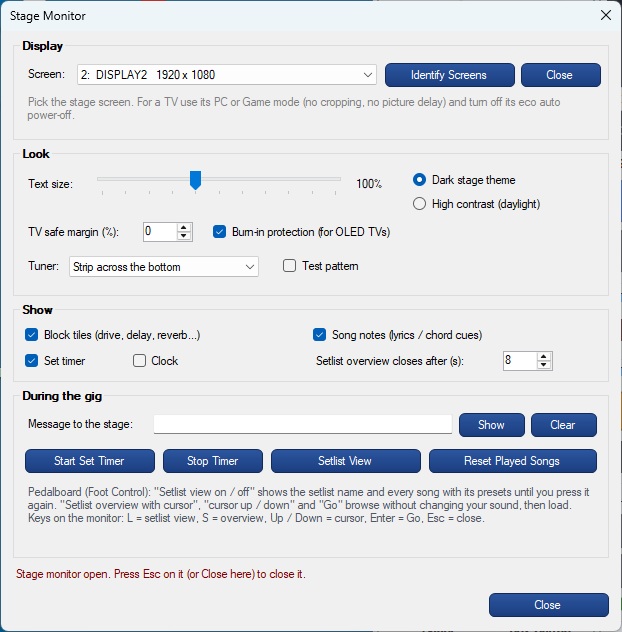
AxeFXIIControl Stage Monitor control window — screen, text size, theme, tuner and messages to the stage
Stage Monitor (click to view)
Song, section and preset in big type for a second screen or TV
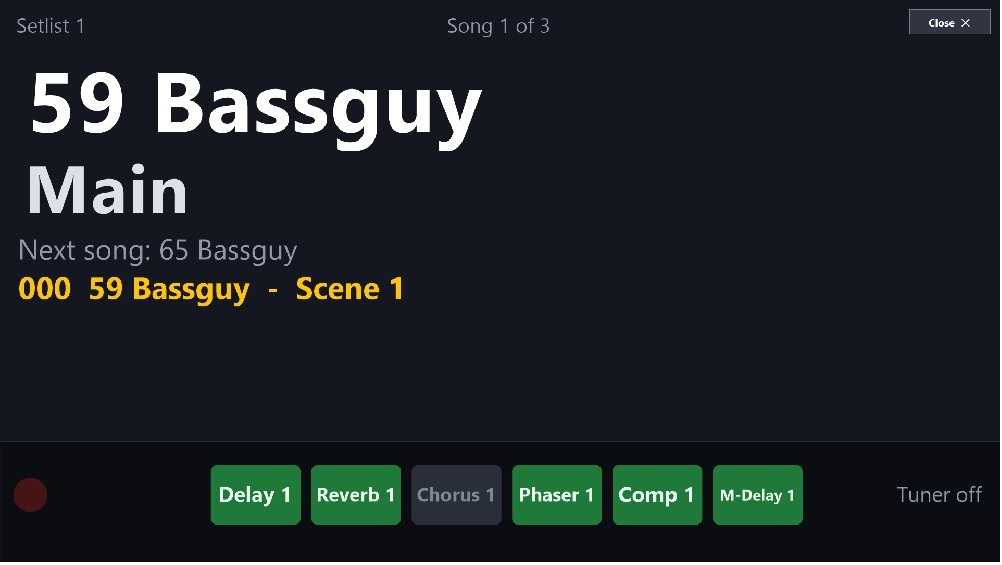
AxeFXIIControl Stage Monitor — song, section, next song, preset and block tiles in big type for the stage
Foot Control (click to view)
MIDI Learn for an FCB1010 or any MIDI pedal
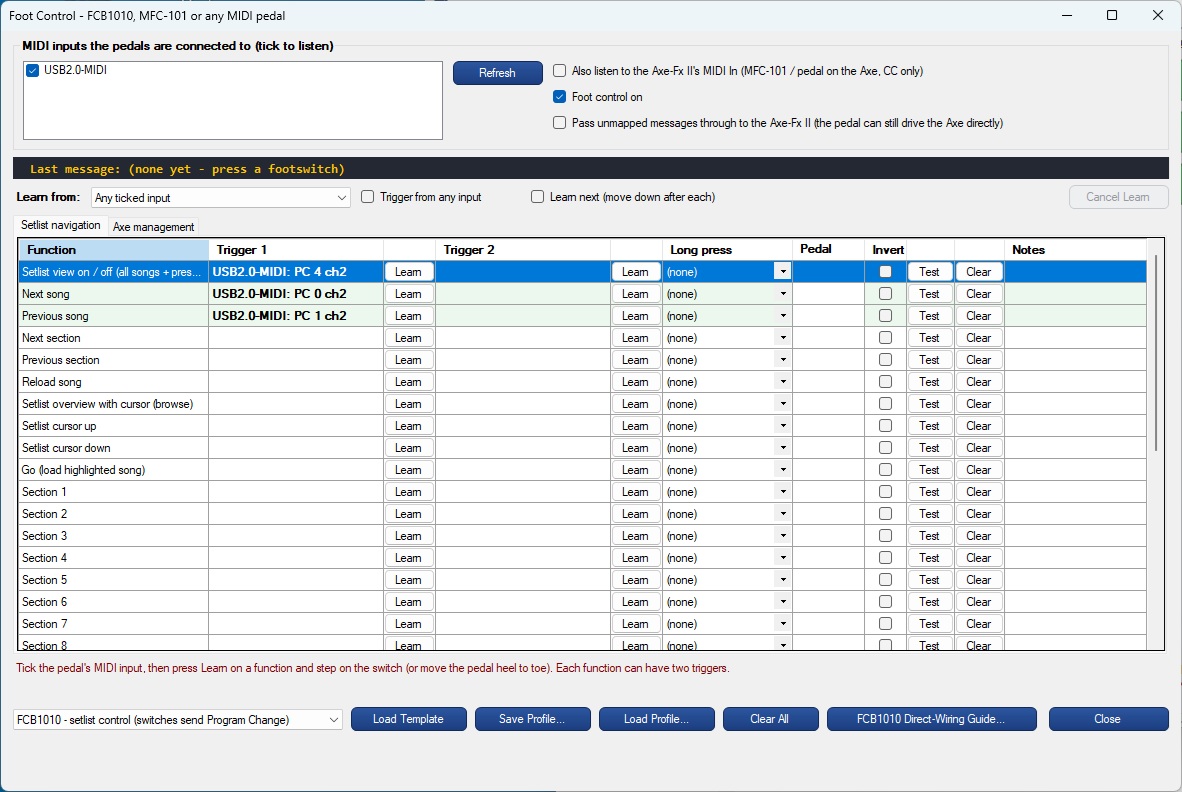
AxeFXIIControl Foot Control — FCB1010 / MIDI pedal MIDI Learn for setlist navigation and Axe management
External Controllers (click to view)
Twelve faders sending CC 16-27
AxeFXIIControl External Controllers — twelve faders sending CC 16-27

System Requirements

Minimum Requirements

  • OS Windows 10 or Windows 11
  • Runtime .NET Framework 4.8 (built into current Windows)
  • Disk 15 MB free space
  • MIDI Axe-Fx II USB (Fractal Audio USB driver) or a USB-MIDI / DIN-MIDI interface
  • Hardware Fractal Audio Axe-Fx II, XL or XL+
  • Optional Second monitor or TV for the Stage Monitor; MIDI foot controller (e.g. Behringer FCB1010)
  • Net No internet connection required

Version History

  • v1.0 First release — built from my list of Axe FXII 'nice to have' notes
  • Live control, setlists, Stage Monitor, preset list, scene matrix
  • Foot Control with MIDI Learn, 98-function Settings guide, CC Map

Frequently Asked Questions

Everything you need to know about AxeFXIIControl.

AxeFXIIControl brings your Fractal Audio Axe-Fx II, XL or XL+ onto your computer screen, so the features buried behind front-panel buttons and menu pages are a click away. It is built for two kinds of players: the home-studio guitarist who wants to find a preset, switch scenes or bypass a block without hunting through pages, and the stage performer who needs setlists, a big Stage Monitor and foot-pedal control they can rely on in the middle of a song. It adds what the Axe-Fx II never had (setlists with songs and sections, instant preset search and a scene matrix) and lists every front-panel function, numbered and searchable, with step-by-step button instructions and, wherever MIDI allows, a control that does it for you. AxeFXIIControl works alongside Fractal Audio's Axe-Edit; it is not a replacement. Keep using Axe-Edit to build and fine-tune your tones, and use AxeFXIIControl to find, organize and play them. One click hands the Axe-Fx II over to Axe-Edit, and AxeFXIIControl reconnects when Axe-Edit closes.
No. Axe-Edit is Fractal Audio's preset editor; AxeFXIIControl is for playing and organising - setlists, the Stage Monitor, foot control, scenes and presets. They work side by side: the Axe-Edit button hands the Axe-Fx II's MIDI ports to Axe-Edit and reconnects when Axe-Edit closes.
The Fractal Audio Axe-Fx II (Mark I / II), Axe-Fx II XL and Axe-Fx II XL+. It was developed and tested on an Axe-Fx II XL+.
Over the Axe-Fx II's own USB port (with the Fractal Audio USB driver installed), or through any USB-MIDI or DIN-MIDI interface. It connects automatically and keeps trying for five minutes if the unit is switched on later.
Yes. Foot Control maps FCB1010 (or MFC-101, or any MIDI pedal) switches and expression pedals to songs, sections, scenes, presets, tap tempo, tuner, blocks and the looper, with MIDI Learn - including Bank + Program Change, latching / momentary switches and pedal calibration.
Yes - completely free for personal and professional use. No license key, no activation, no subscription and no internet connection required.
Windows 10 or Windows 11, the .NET Framework 4.8 (built into current Windows 10 and 11), and an Axe-Fx II, XL or XL+ connected by USB or a MIDI interface. A second monitor or TV and a MIDI foot controller are optional.

AxeFXIIControl — Free Fractal Audio Axe-Fx II Control Screen for Windows | Sierra Digital Audio

🎸 AxeFXIIControl

A free Windows control screen for the Fractal Audio Axe-Fx II, XL and XL+ — built for playing live.

Free Software

Your Axe-Fx II, your stage, your control!

AxeFXIIControl brings your Fractal Audio Axe-Fx II, XL or XL+ onto your computer screen, so the features buried behind front-panel buttons and menu pages are a click away. It is built for two kinds of players: the home-studio guitarist who wants to find a preset, switch scenes or bypass a block without hunting through pages, and the stage performer who needs setlists, a big Stage Monitor and foot-pedal control they can rely on in the middle of a song. It adds what the Axe-Fx II never had (setlists with songs and sections, instant preset search and a scene matrix) and lists every front-panel function, numbered and searchable, with step-by-step button instructions and, wherever MIDI allows, a control that does it for you.

Complements Axe-Edit, never replaces it. AxeFXIIControl works alongside Fractal Audio's Axe-Edit; it is not a replacement. Keep using Axe-Edit to build and fine-tune your tones, and use AxeFXIIControl to find, organize and play them. One click hands the Axe-Fx II over to Axe-Edit, and AxeFXIIControl reconnects when Axe-Edit closes.

  • Live control — preset list by number and name, ▲ / ▼ next and previous, 8 scene buttons, every block's engage / bypass and X / Y, tap and set tempo, tuner readout and looper
  • Two-way sync — follows changes made on the Axe-Fx II front panel; connects automatically and keeps trying for 5 minutes if the unit is switched on later
  • Presets — a local list of all 768 presets with names, amps, cabs, drives and blocks; instant search; ships with the XL / XL+ factory list; Resync All, Selected or Range
  • Setlists — songs with named sections (each a scene, and optionally its own preset), tempo and notes; drag presets in; print and export; full-screen Perform view
  • Stage Monitor — a big display for a second monitor or TV, readable from 10 feet: song, section, next, preset, stage banners (DROP D), tuner strip, setlist view and browse-then-Go
  • Foot Control — Behringer FCB1010, MFC-101 or any MIDI pedal; MIDI Learn with Bank + Program Change, latching / momentary switches, pedal calibration, long press and profiles
  • Scene Matrix — all 8 scenes of a preset against every block on one screen; click to change a block in a scene
  • Settings — 98 Axe-Fx II functions numbered by importance and searchable, each with front-panel button steps and, where possible, a MIDI control that does it for you
  • Controllers — External Controllers 1–12 as faders; CC Map with MIDI Learn-friendly defaults; Test MIDI finds the unit's MIDI channel
  • Axe-Edit hand-over — one button starts Axe-Edit and reconnects when it closes
  • Standalone — Axe-Fx II USB or any USB-MIDI / DIN-MIDI interface · 100% offline · no license key
Fractal Audio Axe-Fx II XL+ front panel
Live Control (click to view)
Presets, scenes, blocks, tempo, tuner and looper
AxeFXIIControl main window — preset list, scenes, blocks, tempo, tuner and looper for the Axe-Fx II
Presets (click to view)
Every preset with amps, cab and drive; search and resync
AxeFXIIControl Presets — local list of all presets with amps, cabs, drives and blocks, search and resync
Scene Matrix (click to view)
Every block across all 8 scenes, bypass and X / Y
AxeFXIIControl Scene Matrix — every block against all 8 scenes, engaged / bypassed and X / Y
Setlists (click to view)
Setlists, songs and presets with drag and drop
AxeFXIIControl Setlists — setlists, songs and all presets side by side with drag and drop
Stage Monitor Settings (click to view)
Screen, text size, theme, tuner and messages
AxeFXIIControl Stage Monitor control window — screen, text size, theme, tuner and messages to the stage
Stage Monitor (click to view)
Song, section and preset in big type for a second screen or TV
AxeFXIIControl Stage Monitor — song, section, next song, preset and block tiles in big type for the stage
Foot Control (click to view)
MIDI Learn for an FCB1010 or any MIDI pedal
AxeFXIIControl Foot Control — FCB1010 / MIDI pedal MIDI Learn for setlist navigation and Axe management
External Controllers (click to view)
Twelve faders sending CC 16-27
AxeFXIIControl External Controllers — twelve faders sending CC 16-27

System Requirements

Minimum Requirements

  • OS Windows 10 or Windows 11
  • Runtime .NET Framework 4.8 (built into current Windows)
  • Disk 15 MB free space
  • MIDI Axe-Fx II USB (Fractal Audio USB driver) or a USB-MIDI / DIN-MIDI interface
  • Hardware Fractal Audio Axe-Fx II, XL or XL+
  • Optional Second monitor or TV for the Stage Monitor; MIDI foot controller (e.g. Behringer FCB1010)
  • Net No internet connection required

Version History

  • v1.0 First release — built from my list of Axe FXII 'nice to have' notes
  • Live control, setlists, Stage Monitor, preset list, scene matrix
  • Foot Control with MIDI Learn, 98-function Settings guide, CC Map

Frequently Asked Questions

Everything you need to know about AxeFXIIControl.

AxeFXIIControl brings your Fractal Audio Axe-Fx II, XL or XL+ onto your computer screen, so the features buried behind front-panel buttons and menu pages are a click away. It is built for two kinds of players: the home-studio guitarist who wants to find a preset, switch scenes or bypass a block without hunting through pages, and the stage performer who needs setlists, a big Stage Monitor and foot-pedal control they can rely on in the middle of a song. It adds what the Axe-Fx II never had (setlists with songs and sections, instant preset search and a scene matrix) and lists every front-panel function, numbered and searchable, with step-by-step button instructions and, wherever MIDI allows, a control that does it for you. AxeFXIIControl works alongside Fractal Audio's Axe-Edit; it is not a replacement. Keep using Axe-Edit to build and fine-tune your tones, and use AxeFXIIControl to find, organize and play them. One click hands the Axe-Fx II over to Axe-Edit, and AxeFXIIControl reconnects when Axe-Edit closes.
No. Axe-Edit is Fractal Audio's preset editor; AxeFXIIControl is for playing and organising - setlists, the Stage Monitor, foot control, scenes and presets. They work side by side: the Axe-Edit button hands the Axe-Fx II's MIDI ports to Axe-Edit and reconnects when Axe-Edit closes.
The Fractal Audio Axe-Fx II (Mark I / II), Axe-Fx II XL and Axe-Fx II XL+. It was developed and tested on an Axe-Fx II XL+.
Over the Axe-Fx II's own USB port (with the Fractal Audio USB driver installed), or through any USB-MIDI or DIN-MIDI interface. It connects automatically and keeps trying for five minutes if the unit is switched on later.
Yes. Foot Control maps FCB1010 (or MFC-101, or any MIDI pedal) switches and expression pedals to songs, sections, scenes, presets, tap tempo, tuner, blocks and the looper, with MIDI Learn - including Bank + Program Change, latching / momentary switches and pedal calibration.
Yes - completely free for personal and professional use. No license key, no activation, no subscription and no internet connection required.
Windows 10 or Windows 11, the .NET Framework 4.8 (built into current Windows 10 and 11), and an Axe-Fx II, XL or XL+ connected by USB or a MIDI interface. A second monitor or TV and a MIDI foot controller are optional.